

LeetCode 题解工作台
重塑矩阵
在 MATLAB 中,有一个非常有用的函数 reshape ,它可以将一个 m x n 矩阵重塑为另一个大小不同( r x c )的新矩阵,但保留其原始数据。 给你一个由二维数组 mat 表示的 m x n 矩阵,以及两个正整数 r 和 c ,分别表示想要的重构的矩阵的行数和列数。 重构后的矩阵需要…
3
题型
7
代码语言
3
相关题
当前训练重点
简单 · 数组·matrix
答案摘要
我们先获取原矩阵的行数和列数,分别记为 和 。如果 $m \times n \neq r \times c$,则无法重塑矩阵,直接返回原矩阵。 否则,我们创建一个新矩阵,新矩阵的行数为 ,列数为 。我们从原矩阵的第一个元素开始,按照行优先的顺序遍历原矩阵的所有元素,将遍历到的元素按顺序放入新矩阵中。


Interview AiBoxInterview AiBox 实时 AI 助手,陪你讲清 数组·matrix 题型思路
题目描述
在 MATLAB 中,有一个非常有用的函数 reshape ,它可以将一个 m x n 矩阵重塑为另一个大小不同(r x c)的新矩阵,但保留其原始数据。
给你一个由二维数组 mat 表示的 m x n 矩阵,以及两个正整数 r 和 c ,分别表示想要的重构的矩阵的行数和列数。
重构后的矩阵需要将原始矩阵的所有元素以相同的 行遍历顺序 填充。
如果具有给定参数的 reshape 操作是可行且合理的,则输出新的重塑矩阵;否则,输出原始矩阵。
示例 1:
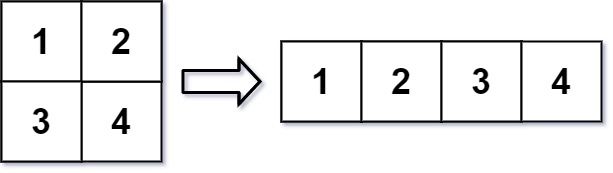
输入:mat = [[1,2],[3,4]], r = 1, c = 4
输出:[[1,2,3,4]]
示例 2:
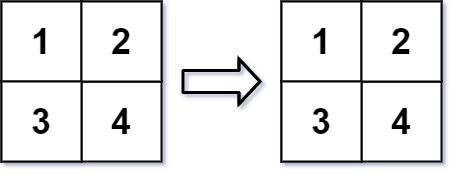
输入:mat = [[1,2],[3,4]], r = 2, c = 4
输出:[[1,2],[3,4]]
提示:
m == mat.lengthn == mat[i].length1 <= m, n <= 100-1000 <= mat[i][j] <= 10001 <= r, c <= 300
解题思路
方法一:模拟
我们先获取原矩阵的行数和列数,分别记为 和 。如果 ,则无法重塑矩阵,直接返回原矩阵。
否则,我们创建一个新矩阵,新矩阵的行数为 ,列数为 。我们从原矩阵的第一个元素开始,按照行优先的顺序遍历原矩阵的所有元素,将遍历到的元素按顺序放入新矩阵中。
遍历完原矩阵的所有元素后,我们即可得到答案。
时间复杂度 ,其中 和 分别是原矩阵的行数和列数。忽略答案的空间消耗,空间复杂度 。
class Solution:
    def matrixReshape(self, mat: List[List[int]], r: int, c: int) -> List[List[int]]:
        m, n = len(mat), len(mat[0])
        if m * n != r * c:
            return mat
        ans = [[0] * c for _ in range(r)]
        for i in range(m * n):
            ans[i // c][i % c] = mat[i // n][i % n]
        return ans
复杂度分析
| 指标 | 值 |
|---|---|
| 时间 | Depends on the final approach |
| 空间 | Depends on the final approach |
面试官常问的追问
外企场景- question_mark
The candidate should recognize the importance of handling array indexing correctly when reshaping the matrix.
- question_mark
Look for the candidate's ability to validate the reshaping dimensions before proceeding.
- question_mark
Expect the candidate to explain the time and space complexity of their approach.
常见陷阱
外企场景- error
Failing to check if the reshape dimensions are valid before attempting to reshape.
- error
Incorrectly mapping the 1D array back into a 2D matrix, potentially losing elements.
- error
Not considering edge cases where the reshape operation is impossible.
进阶变体
外企场景- arrow_right_alt
Given a 2D matrix, reshape it to match any specified dimensions, with varying boundary conditions (e.g., non-matching dimensions).
- arrow_right_alt
Reshape a matrix and also transpose it simultaneously.
- arrow_right_alt
Implement an in-place reshape operation that modifies the original matrix.