

LeetCode 题解工作台
Excel 表中某个范围内的单元格
Excel 表中的一个单元格 (r, c) 会以字符串 " " 的形式进行表示,其中: 即单元格的列号 c 。用英文字母表中的 字母 标识。 例如,第 1 列用 'A' 表示,第 2 列用 'B' 表示,第 3 列用 'C' 表示,以此类推。 即单元格的行号 r 。第 r 行就用 整数 r 标识。 …
1
题型
5
代码语言
3
相关题
当前训练重点
简单 · String-driven solution strategy
答案摘要
我们直接遍历范围内的所有单元格,将其添加到答案数组中。 时间复杂度 $O(m \times n)$,空间复杂度 $O(m \times n)$,其中 和 分别为行数和列数的取值范围。


Interview AiBoxInterview AiBox 实时 AI 助手,陪你讲清 String-driven solution strategy 题型思路
题目描述
Excel 表中的一个单元格 (r, c) 会以字符串 "<col><row>" 的形式进行表示,其中:
<col>即单元格的列号c。用英文字母表中的 字母 标识。- 例如,第
1列用'A'表示,第2列用'B'表示,第3列用'C'表示,以此类推。
- 例如,第
<row>即单元格的行号r。第r行就用 整数r标识。
给你一个格式为 "<col1><row1>:<col2><row2>" 的字符串 s ,其中 <col1> 表示 c1 列,<row1> 表示 r1 行,<col2> 表示 c2 列,<row2> 表示 r2 行,并满足 r1 <= r2 且 c1 <= c2 。
找出所有满足 r1 <= x <= r2 且 c1 <= y <= c2 的单元格,并以列表形式返回。单元格应该按前面描述的格式用 字符串 表示,并以 非递减 顺序排列(先按列排,再按行排)。
示例 1:
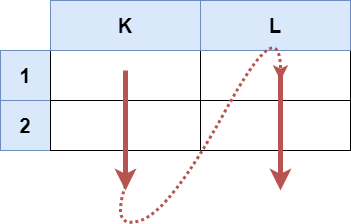
输入:s = "K1:L2"
输出:["K1","K2","L1","L2"]
解释:
上图显示了列表中应该出现的单元格。
红色箭头指示单元格的出现顺序。
示例 2:

输入:s = "A1:F1"
输出:["A1","B1","C1","D1","E1","F1"]
解释:
上图显示了列表中应该出现的单元格。
红色箭头指示单元格的出现顺序。
提示:
s.length == 5'A' <= s[0] <= s[3] <= 'Z''1' <= s[1] <= s[4] <= '9's由大写英文字母、数字、和':'组成
解题思路
方法一:模拟
我们直接遍历范围内的所有单元格,将其添加到答案数组中。
时间复杂度 ,空间复杂度 ,其中 和 分别为行数和列数的取值范围。
class Solution:
    def cellsInRange(self, s: str) -> List[str]:
        return [
            chr(i) + str(j)
            for i in range(ord(s[0]), ord(s[-2]) + 1)
            for j in range(int(s[1]), int(s[-1]) + 1)
        ]
复杂度分析
| 指标 | 值 |
|---|---|
| 时间 | Depends on the final approach |
| 空间 | Depends on the final approach |
面试官常问的追问
外企场景- question_mark
Can the candidate efficiently parse a string to extract multiple pieces of data?
- question_mark
Does the candidate account for the sorting requirement, ensuring the correct order of columns and rows?
- question_mark
Is the candidate aware of potential edge cases, such as minimal or maximal ranges?
常见陷阱
外企场景- error
Forgetting to properly convert column letters to numeric values, which is critical for looping through columns.
- error
Not handling the inclusive nature of the range properly, resulting in missing or extra cells.
- error
Failing to consider that Excel columns are alphabetic (A, B, ..., Z, AA, AB, ...) rather than numeric, leading to incorrect column indexing.
进阶变体
外企场景- arrow_right_alt
Different representations of the input range (e.g., 'A1:B2' vs. 'A1:F5').
- arrow_right_alt
Modifying the format of the output (e.g., returning a 2D array instead of a 1D list).
- arrow_right_alt
Expanding the problem to support larger or dynamic Excel ranges with more rows/columns.